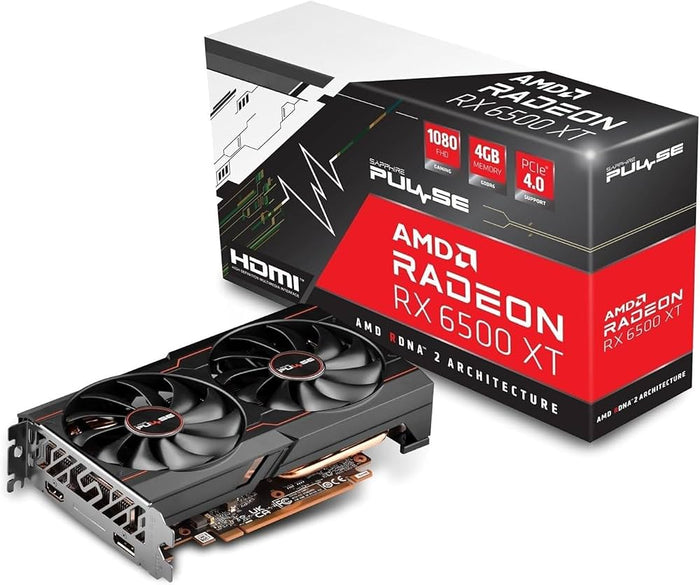
A future-proof gaming PC build should prioritise the power supply, case, motherboard features, storage capacity and upgrade flexibility instead of expensive hardware you may never use. Choose a strong current GPU and CPU for your target games, then leave practical room for additional storage, memory, cooling and a future graphics card upgrade.
What Does Future-Proofing a Gaming PC Mean?
Future-proofing means choosing components that remain useful as games, applications and hardware requirements change. It does not mean guaranteeing that a PC will run every future game at maximum settings.
Technology changes too quickly for any build to remain permanently current. A sensible strategy is to avoid immediate limitations, select reliable parts and make future upgrades easier without replacing the entire system.
For most gaming PCs, future-proofing should focus on:
-
A power supply with reasonable capacity and modern connectors.
-
A case with enough room for larger GPUs and cooling systems.
-
A motherboard with useful connectivity and upgrade support.
-
Sufficient RAM and fast storage.
-
A platform that allows at least one meaningful upgrade.
-
A graphics card that meets your current resolution and settings target.
Do not sacrifice present-day performance for a theoretical upgrade several years away. A gaming PC that performs poorly now is not a successful future-proof build.
Which Components Are Worth Future-Proofing?
The components worth future-proofing are those that are difficult, expensive or inconvenient to replace later. The power supply, case and motherboard are usually more important in this respect than buying an unnecessarily high-end CPU.
Storage and RAM are also worth planning because modern games and software can use more capacity over time. A motherboard with spare slots and a case with accessible mounting positions make these upgrades easier.
A current mid-range component that fits your actual workload is often a better purchase than a premium part selected only for its name. Put the budget into areas that affect gaming today and upgrades later.
Is Buying a Bigger PSU Than Needed Worth It?
Buying a bigger PSU than you currently need can be worthwhile when the extra capacity is reasonable, the unit is high quality and you plan to install a more demanding graphics card later. It is not necessary to buy an oversized unit simply because a larger wattage number sounds safer.
The answer to “is a bigger PSU than needed worth it?” depends on your upgrade plan. If you may move to a higher-power GPU, select a reliable PSU with enough headroom and the correct connectors for that upgrade.
A power supply should not be chosen by wattage alone. Efficiency, protections, build quality, warranty, connector standards and acoustic performance are equally important.
Avoid reducing the quality of the PSU to afford a larger wattage model. A dependable unit with suitable headroom is better than a cheaply built unit with an impressive capacity rating.
How Much PSU Headroom Should You Plan?
Plan PSU headroom around a realistic future GPU upgrade rather than every possible high-end component. Check the graphics card manufacturer’s power guidance and the complete system’s expected consumption before selecting the unit.
Remember that the PSU must also provide the required cables and connectors. A future graphics card may use a different power connector, so connector support can be as important as total capacity.
A larger PSU does not automatically make a PC faster. It simply gives the system more available power and may reduce the need to replace the unit during a future upgrade.
Do not use adapters or modular cables without confirming compatibility. Modular PSU cables are not universally interchangeable, and an incorrect cable can damage hardware.
Should You Future-Proof the CPU?
Choose a CPU that is strong enough for your current graphics card, games and applications. Buying a much more powerful processor than necessary can reduce the budget available for the GPU, which is often more important for gaming performance.
CPU future-proofing makes sense when the motherboard platform supports later processor upgrades. It also helps to choose a processor with enough core and thread capacity for your other workloads, such as streaming, editing or content creation.
Do not buy a premium CPU for a low-end GPU and expect it to transform gaming performance. A balanced CPU-GPU combination is more effective than spending heavily on one component while creating a bottleneck elsewhere.
How Should You Future-Proof the GPU?
The GPU has a major effect on gaming performance, so it should be chosen according to your target resolution, refresh rate and graphics settings. Buying a card that is too weak creates an immediate limitation, while buying far more GPU than your monitor can use may waste budget.
Consider graphics memory, display outputs, hardware encoding, upscaling support and ray-tracing capability. These features can affect how long the graphics card remains useful as games and creative applications evolve.
Future GPU requirements are difficult to predict, so do not select a graphics card solely based on rumours or speculative game requirements. Choose a model that provides comfortable performance for the games you play now and has enough feature support for your expected ownership period.
A better GPU may also require a stronger PSU, a larger case and improved airflow. Treat the graphics card as part of a complete system rather than an isolated upgrade.
Is More RAM Always Better for Future-Proofing?
More RAM can help a PC remain comfortable as games, browsers, creative applications and operating systems become more demanding. However, capacity should be balanced with memory speed, compatibility and the motherboard’s supported configuration.
A system with insufficient RAM may experience stuttering, slow application switching and increased reliance on storage. A system with far more RAM than its workload requires may provide little gaming benefit.
Check whether the motherboard has spare memory slots and whether adding another kit later could affect stability. Matching memory kits are generally easier to configure than combining unrelated modules.
Choose a complete kit that matches the motherboard platform. Do not assume that adding any random RAM module later will produce the same compatibility or performance.
How Does the Motherboard Affect Future Upgrades?
The motherboard determines the processor socket, memory type, expansion slots, storage connectivity and many external features. It is one of the most important parts to evaluate when planning a future upgrade path.
A budget motherboard may be perfectly suitable for a basic build, but it may have fewer M.2 slots, weaker power delivery, limited USB connectivity or less expansion room. These limitations can make later upgrades more expensive.
Check the following before buying:
-
CPU socket and supported processor generations.
-
BIOS support and update options.
-
Number and location of M.2 slots.
-
Memory slots and maximum supported capacity.
-
PCIe slot layout.
-
USB ports and networking features.
-
Fan headers and cooling control.
-
VRM cooling and power delivery.
A motherboard should not be purchased solely for an expensive feature you will never use. Select the chipset and board layout according to your upgrade plans, case size and connected devices.
Is a More Expensive Chipset Always Better?
A more expensive chipset is not automatically more future-proof. The value depends on whether its additional connectivity, processor support, storage options or expansion features match your needs.
For example, a higher-tier board may offer more M.2 slots and USB ports, but those features have limited value if you use one SSD and a small number of peripherals. Conversely, a creator or enthusiast may quickly outgrow an entry-level board.
Future-proofing means buying useful capability, not the most expensive chipset. Confirm that the motherboard supports the upgrades you are genuinely likely to make.
Why Is the PC Case Important for Future-Proofing?
The case is one of the longest-lasting parts in a gaming PC. A good case can be reused across several upgrades, while a poorly chosen case may force you to replace it when installing a larger GPU or cooler.
Check graphics card length, GPU thickness, CPU cooler height, radiator support, power supply compatibility and cable-routing space. Airflow is especially important because future graphics cards and processors may produce more heat.
A case with adjustable fan mounting positions gives you more flexibility. Front, top, rear and bottom support can help you adapt the airflow layout when the internal hardware changes.
Avoid selecting a case solely for its appearance. A well-designed case can protect your investment by remaining useful through multiple component upgrades.
How Should You Plan Storage?
Storage is one of the easiest components to upgrade, but running out of space can become inconvenient quickly. Plan at least one fast SSD for the operating system, applications and frequently played games, then leave room for additional storage.
Check the motherboard’s M.2 slot count and whether installing one drive disables a SATA port or expansion slot. Also confirm that the case includes suitable mounting points if you plan to add 2.5-inch or 3.5-inch drives.
A larger SSD can simplify game management, but capacity should not come at the expense of a quality power supply or graphics card. Add storage later if the motherboard and case make expansion easy.
What Should You Not Future-Proof?
Some areas are easy to upgrade later and do not justify overspending at the initial build stage. RGB lighting, decorative cables, extra case accessories and premium cooling features can usually be added or changed without replacing core hardware.
You also do not need to buy a high-end CPU or GPU solely because it might last longer. If the component is far beyond your current monitor and gaming requirements, the money may provide better value elsewhere.
Avoid future-proofing through:
-
Excessive PSU capacity without a realistic upgrade plan.
-
Unused motherboard features.
-
More RAM than your workloads can use.
-
Premium cooling for an efficient CPU.
-
High-end GPU hardware for a low-resolution display.
-
Decorative accessories purchased before core components.
-
Expensive storage capacity you will not use.
Spend on the parts that are expensive or difficult to replace later. Delay accessories and easy upgrades until the system’s main performance and reliability requirements are covered.
How Often Should You Upgrade a Gaming PC?
You should upgrade a gaming PC when it no longer delivers the performance, features or storage capacity you need—not simply because a new generation has launched. Different components require upgrades at different times.
A graphics card is commonly replaced when you change resolution, increase settings or need newer features. Storage can be expanded whenever capacity becomes restrictive, while RAM may need an upgrade when multitasking or new games cause memory pressure.
A staged upgrade plan is usually more affordable than replacing the entire PC at once. Choose the initial platform so that at least the likely upgrades—such as storage, RAM or GPU—can be completed without rebuilding everything.
What Is a Realistic Future-Proof Gaming PC Strategy?
The most realistic strategy is to build for your current needs with one or two planned upgrade options. Select a reliable PSU with sensible headroom, a case with adequate clearance, a motherboard with useful features and enough storage expansion.
Do not pay a large premium for uncertain future performance. Hardware prices, game engines, display standards and software requirements change, so flexibility is more valuable than trying to predict the market years in advance.
A strong plan looks like this:
-
Set a target resolution, refresh rate and game list.
-
Choose the GPU that meets those current requirements.
-
Select a CPU that will not restrict the GPU.
-
Choose a motherboard with a practical upgrade path.
-
Buy a quality PSU with realistic future headroom.
-
Select a case that supports larger cooling and graphics hardware.
-
Leave room for additional storage or RAM.
-
Add aesthetic accessories only after performance parts are finalised.
This approach gives you useful longevity without paying for hardware you may never need.
Frequently Asked Questions
What PC components are actually worth future-proofing?
The power supply, case, motherboard, storage capacity and cooling support are usually the most valuable components to future-proof. These parts can affect whether future CPUs, GPUs, drives or cooling systems fit and work correctly.
RAM capacity and motherboard expansion options are also worth planning. Do not overspend on an extreme CPU or GPU unless it improves your current gaming experience.
Is it worth buying a bigger PSU than I currently need?
A moderately larger PSU can be worthwhile if you have a realistic plan to install a more powerful graphics card later. Check the PSU’s quality, efficiency, protections and connector support instead of focusing only on capacity.
Avoid buying a very oversized or low-quality PSU just for future-proofing. A dependable unit with sensible upgrade headroom is the better choice.
How often should I plan to upgrade a gaming PC?
Plan upgrades based on performance needs rather than a fixed calendar. The GPU is usually upgraded when it no longer meets your resolution or settings target, while storage and RAM can be upgraded when capacity becomes restrictive.
A well-planned gaming PC can often be improved in stages. Choosing a compatible motherboard, case and power supply makes these upgrades easier and reduces the chance of replacing the whole system.
Read StudBudPC’s PC component lifespan guide and gaming PC upgrade guide before finalising your future-proof build.